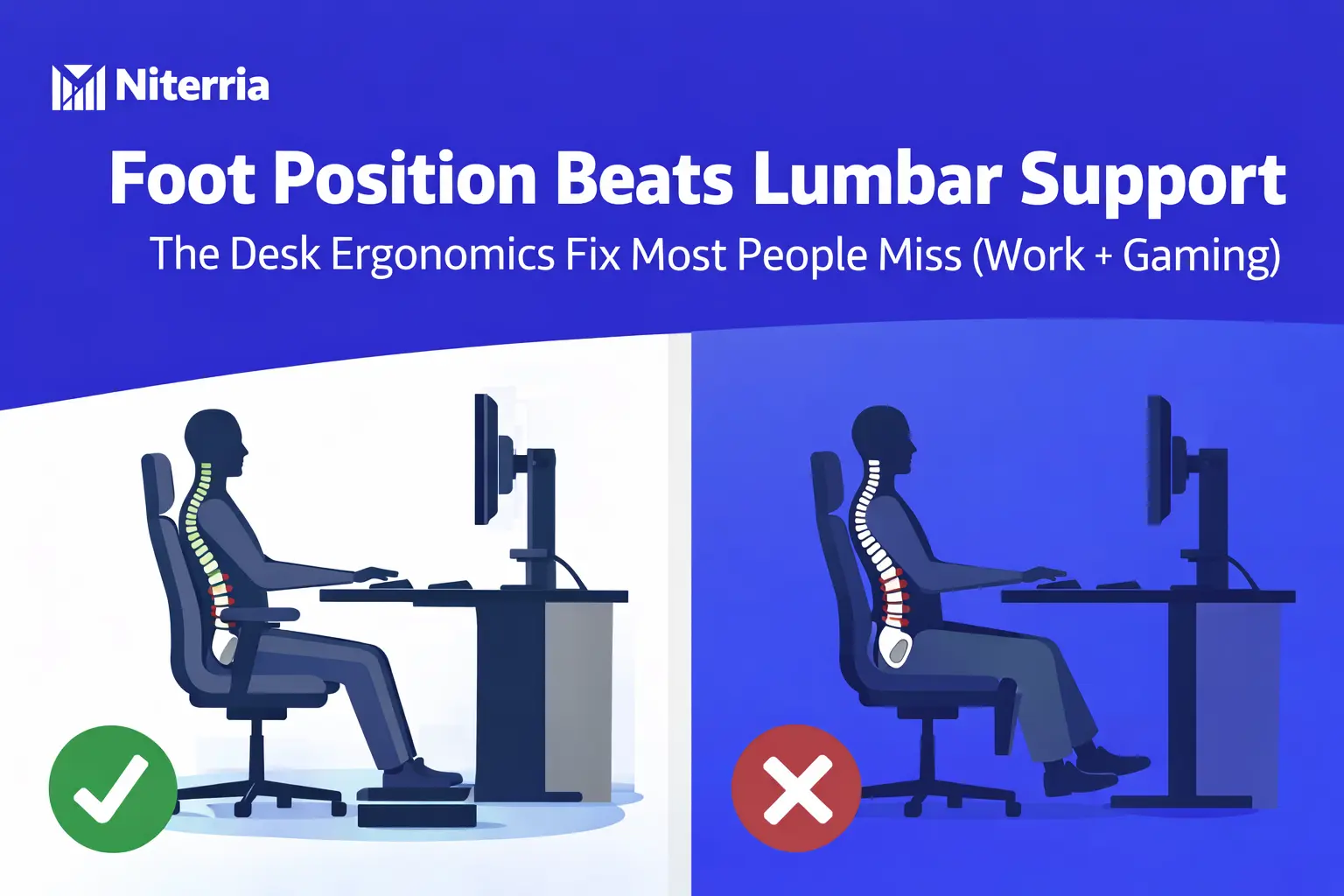
Foot Position Beats Lumbar Support: The Desk Ergonomics Fix Most People Miss (Work + Gaming)
If your lower back gets angry after a few hours, you’re probably trying to “fix posture” from the top down: chair back, lumbar knob, cushion, miracle ergonomics marketing. The boring truth: your feet decide your pelvis, and your pelvis decides your lumbar spine.
Quick Answer Box
Foot position often matters more than lumbar support because stable feet create a stable pelvis. Without that “anchor,” your body slides, tucks, and collapses—then lumbar support just pokes you while you fight it.
- Rule: Feet flat + knees ~90° + hips slightly open (100–110°) beats “perfect lumbar.”
- If your heels don’t reach the floor comfortably, fix that first (lower chair or add a footrest).
- If your seat is too high, you’ll posteriorly tilt (butt tucks) and the low back rounds.
- If your seat is too low, hips close, you slump forward, and lumbar support becomes irrelevant.
- Fast win: 60 seconds: adjust chair height → add foot support → then set lumbar.
Jump links: Best approach · Steps · Decision table · Mistakes · FAQ
Best approach (for most people)
Best for most people: Fix foot support + chair height first, then dial lumbar last.
- Why it works: Feet anchored → pelvis stable → lumbar support can actually “support” instead of annoy.
- Why it works: Correct knee/hip angles reduce sliding forward and reduce constant micro-tension.
- Why it works: You stop using your low back as a “brace” for the whole upper body.
Trade-offs:
- A footrest can feel “weird” for 2–3 days if you’ve been dangling your feet for years.
- If your desk is too high, foot fixes expose the real problem: desk height.
Lumbar support vs foot position: what actually decides comfort?
| Problem you feel | Most likely cause | Fix first | What to adjust | Best for |
|---|---|---|---|---|
| Low-back ache + you keep sliding forward | Seat too high or too deep; feet not anchored | Foot position | Lower chair / add footrest / reduce seat depth | Tall chairs, short legs, deep seats |
| Lumbar support feels “too aggressive” or painful | Pelvis tucked (posterior tilt) from dangling feet | Foot position | Footrest + open hip angle; lumbar last | People who hate lumbar pillows |
| Upper-back/neck tension after hours | Desk too high; shoulders shrugged; unstable base | Desk + feet | Lower desk/keyboard or raise chair + footrest | Work + gaming hybrid setups |
| Numb thighs / pressure under legs | Seat edge cuts circulation; seat too high | Chair height | Lower chair; use footrest if desk height forces higher seat | Long sessions (6–12h) |
| Back feels “unsupported” only when typing | Keyboard/mouse too far; you lean forward | Reach setup | Pull input closer; elbows under shoulders | Small desks, deep monitors |
Why this happens: your feet control your pelvis (and your pelvis controls your lumbar spine)
Think of your sitting posture like a tripod. Your feet are the front legs. If they’re dangling or unstable, your pelvis keeps searching for stability by tucking under or sliding forward. That changes spinal shape, and then you blame the chair.
What people get wrong about lumbar support
- Lumbar support doesn’t “fix” posture—it supports a posture you can already hold.
- If the pelvis is unstable, lumbar support becomes a pressure point, not support.
- Most chair “lumbar” is positioned for marketing photos, not your actual torso length.
2-minute setup: fix foot position first (then lumbar)
- Set chair height for feet contact
What to do: Sit back. Place feet flat. If heels can’t stay down comfortably, you’re too high.
Why it works: Heels-down contact stabilizes the pelvis and reduces sliding.
Common mistake: Keeping the seat high “because desk is high.” (That’s a desk problem.) - Check knee angle (~90°)
What to do: Knees around hip height, not significantly higher or lower.
Why it works: Extreme angles push the pelvis into tilt and load the low back.
Common mistake: Crossing legs all day to “create a footrest.” It twists the pelvis. - Open the hips slightly (100–110°)
What to do: If you have tilt, use a tiny rearward tilt; otherwise just avoid a closed hip crunch.
Why it works: Slightly open hips reduce slump tendency and reduce low-back rounding.
Common mistake: Over-tilting and turning it into an aggressive lumbar arch. - Fix seat depth so you’re not pushed forward
What to do: Aim for ~2–3 fingers space behind knee.
Why it works: Too-deep seats force sliding forward and destroy foot anchor.
Common mistake: Using a pillow behind your back but leaving the seat depth unchanged. - Only now: set lumbar support
What to do: Place support in the natural inward curve (not mid-back). Use “barely there,” not “brace.”
Why it works: Stable pelvis + gentle lumbar = low effort support for long sessions.
Common mistake: Treating lumbar like a “corset” you crank tight. - Lock your input reach (work + gaming)
What to do: Pull keyboard/mouse closer; elbows roughly under shoulders.
Why it works: Prevents forward head/lean, which drags the low back into compensation.
Common mistake: Big mousepad + keyboard far away = permanent lean.
Edge cases (where the “foot first” rule needs tweaks)
- If you’re short + your desk is high: Raise chair for arm comfort and use a footrest. Otherwise you trade shoulder pain for back pain.
- If you have sciatic-like symptoms: Avoid aggressive lumbar and hard seat edges. Prioritize gentle support + frequent micro-movement breaks.
- If you sit on a sofa/gaming chair with deep seat: You’ll almost always slide. Add a back cushion to reduce effective seat depth and use a footrest.
- If you’re tall with long legs: You can still fail foot anchor if the seat pan is tilted wrong. Ensure you’re not constantly pushing your feet forward to “brace.”
- If you do long FPS sessions: Foot stability matters more because you brace during aim micro-movements. Unstable base = constant low-level back tension.
Real-world setups (pick the one that matches you)
Scenario 1: You feel fine for 1–2 hours, then low back burns
- Likely: feet unstable → pelvis tucks → lumbar rounds
- Setup: lower chair slightly + footrest if needed + gentle lumbar
- Result: less “holding yourself up” with spinal muscles
Scenario 2: Lumbar support feels like it’s punching you
- Likely: dangling feet or seat too deep → you slide forward to escape pressure
- Setup: fix feet + seat depth first; reduce lumbar aggression
- Result: lumbar becomes support, not a pressure point
Scenario 3: Neck/shoulders die before your back
- Likely: desk too high; inputs too far
- Setup: raise chair for arms + footrest for feet + pull keyboard/mouse in
- Result: shoulders stop shrugging; spine stops compensating
Scenario 4: You keep crossing legs because it feels “better”
- Likely: your body is improvising stability
- Setup: give it real stability (footrest, correct height) so you don’t twist the pelvis
- Result: less asymmetry, fewer flare-ups
How we chose this approach (methodology, not vibes)
This post prioritizes the variables that change comfort the fastest for the most people, with the least spend: foot contact, hip/knee angles, seat depth, and reach. Lumbar support is treated as a tuning knob—not the foundation.
Criteria used (5–7 items)
- Stability of pelvis (feet contact + seat depth)
- Hip angle (closed vs slightly open)
- Knee comfort and circulation (seat height + front edge pressure)
- Reach ergonomics (keyboard/mouse distance)
- Low-effort posture (how little you must “hold”)
- Long-session tolerance (6–12 hours)
What we ignored on purpose
- Chair hype features that don’t change geometry (branding, “racing seat” looks)
- One perfect posture myths (your body needs variation)
- “Expensive chair = solved” assumptions
Related Niterria guides (use these while you fix your setup)
If you want the full system view (not just one fix), start here: Dual-Use Desk Setup Guide and the layout logic in The Dual-Use Desk System.
If your back pain is persistent, read the bigger picture: Lower Back Pain Isn’t a Chair Problem and Chair Marketing vs Reality.
If you’re troubleshooting your desk geometry, fix the silent killers: Desk Height Quietly Destroys Comfort and Desk Ergonomics for 10-Hour Days.
For mouse-side tension that can indirectly pull your posture into trash: Mouse Space vs Wrist Pain, Keyboard Angle Causes Wrist Fatigue, and Heavy Gaming Mouse Fatigue.
If your environment is adding fatigue you mistake for “bad posture,” see: Why Silent Gear Improves Endurance and Desk Clutter Increases Mental Fatigue.
Key takeaways (decision rules you can actually use)
- If heels can’t stay down: fix chair height or add a footrest before touching lumbar.
- If you keep sliding forward: seat depth/height is wrong; lumbar won’t save it.
- If lumbar feels painful: your pelvis is unstable or tucked—stabilize feet first.
- If shoulders/neck hurt: desk height + reach are the real cause; feet support enables the fix.
- Best long-session posture: low-effort stable base + frequent small shifts, not rigid “perfect posture.”
FAQ
Do I need a footrest if my feet already touch the floor?
Usually no. If you can keep heels down, knees comfortable, and you’re not sliding, you’re fine. A footrest helps when desk height forces a higher chair or when your seat depth/tilt destabilizes you.
Is lumbar support useless then?
No—just overrated as the “first fix.” Lumbar is valuable once your base is stable. Think of it as fine-tuning, not the foundation.
What’s the fastest sign my chair is too high?
Heels pop up, feet drift forward, or you feel pressure under thighs. Your body will compensate by tucking the pelvis and rounding the low back.
Why does crossing my legs feel better?
It’s your body creating stability. It can temporarily reduce discomfort, but it twists pelvic alignment and can create one-sided tightness over time.
My desk is fixed-height. What should I prioritize?
Arm comfort + foot support. Set chair height so elbows aren’t floating, then use a footrest to restore foot anchoring. Don’t sacrifice feet contact.
What if I still have low back pain after fixing feet?
Then you’re likely dealing with movement tolerance (too static) or a deeper mismatch (seat depth, reach, monitor height). Start with movement-based fixes here.
Do this next (so the fix sticks)
Re-run the 2-minute setup steps, then sanity-check your desk geometry with desk height and your full layout via the Dual-Use Desk Setup Guide.
Want a quick self-check? Make one change, test for 48 hours, then change the next variable. Don’t “redesign the whole setup” in one day—you’ll never know what worked.
Comments
You need to log in to leave a comment.